
There are upcoming maintenance events which may impact our services. Learn more
Dev License: This installation of WHMCS is running under a Development License and is not authorized to be used for production use. Please report any cases of abuse to [email protected]

WordPress Installation - Plesk Print

  • 0

  1. Login to your https://my.movaci.com account
  2. Navigate to your hosting product and log into your Plesk Control Panel.
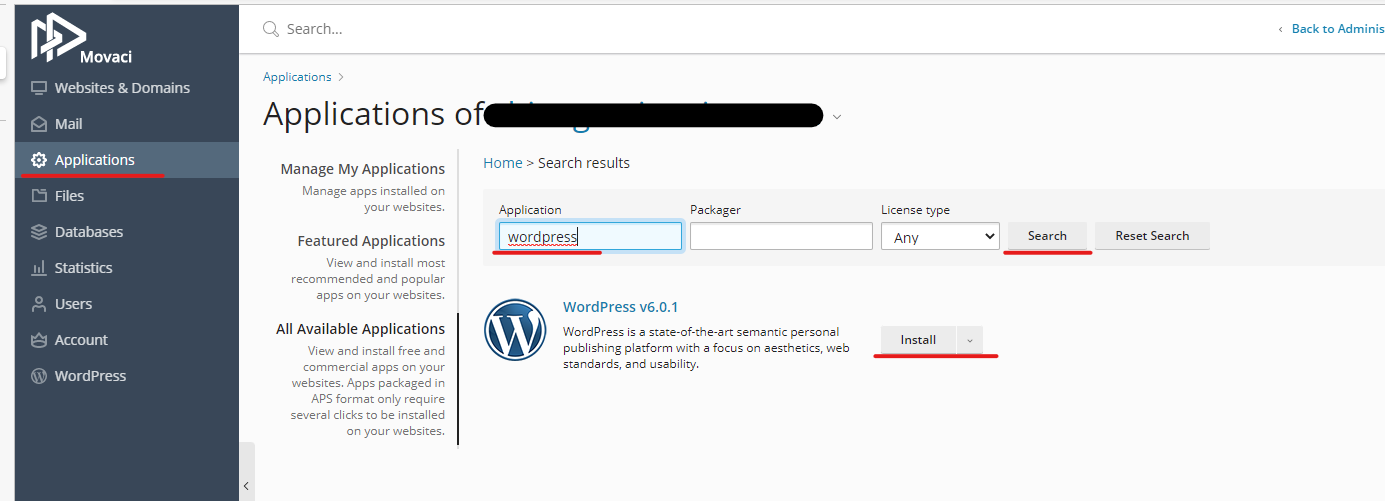
  3. Select Applications >> Search for WordPress >> Select Install and follow the instructions. 
    1. Make sure your website doesn't have an existing website application installed or this will overwrite your existing web application

Was this answer helpful?

« Back

Powered by WHMCompleteSolution